
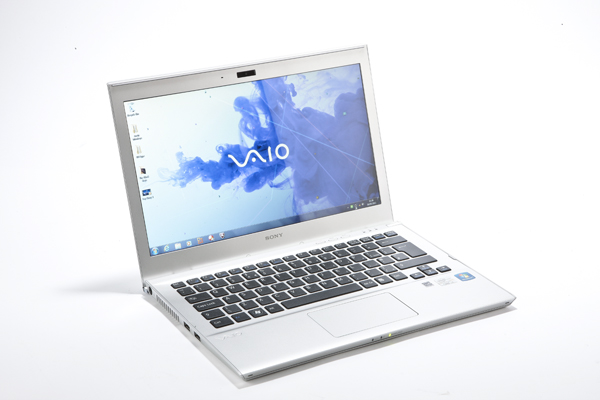
Sony VAIO T 13 – a stylish Ultrabook low-cost class
One of the famous manufacturers of laptops which appeared Ultrabook party was Sony, the company expressed its reluctance so new Intel initiative. Finally, they decided to explore new laptop market has strong, thin, light and something more affordable, but they did shy, with a discounted line: Vaio T.
Construction
In a world ultrabook sites where imagination is not always the strength of manufacturers, Vaio T 13 is characterized by straight lines and design based on ubiquitous silver color. Built mostly covered with a plastic based paint metal powders, Vaio T 13 uses aluminum for the outer surface of the cover the screen, keyboard and restpad mask. Plastic parts are well hardened, but are prone to scratches. Picture of the housing is elegant in this area contributing chrome bar hinge lid, silver Vaio logo on it and stretch good combination of the two base materials.
An interesting detail is the two plastic pins placed on a silver frame hinge, these having both protective role and amending the keyboard angle when opening angle of 110 degrees screen pass.
Those who do not support Portables enclosures with limited or no access to internal components, a practice becoming more common with a silhouette slim rush will be pleased to discover that the Vaio T offers easy access to the battery.
This can be undone with an ordinary coin screw heads are specially designed, it can be found in the rest of the caps and screws that allow exploration of memory and disk area.
This great little excuse and thickness of 17.8 mm, the upper limit of Intel’s Ultrabook specification.

The cooling system is well developed – casing does not heat than the left side, the touchpad and keyboard with ambient temperatures continuously.
Unfortunately, it is not and silent fan is often noticeable even during an unpretentious Office or Internet use and become noisy when running 3D applications and games.
Sony VAIO T 13 Features and Specifications:
Sony has chosen a wide range of facilities for Vaio T, even if some choices are not always in favor of a regular user. Laptop offers Gigabit Ethernet port, a good choice given that other Ultrabook models cheaper satisfied only with Fast Ethernet, card reader, and HDMI video output.
To the delight of users who use laptop in professional and projectors or monitors still use old Vaio T 13 offers a VGA port. For other users, this choice has brought sacrificing a USB port, offering only Vaio T 13 ports, fortunately well spaced, one is USB 3.0.
– Display: 13.3 “, 1366 x 768 pixels, LED backlight
– CPU: Intel Core i3 2367M, 1,4 GHz
– Chipset: Intel HM77
– Integrated GPU: Intel HD Graphics 3000
– RAM: 1 x 4GB DDR3 (inseparably), 1 free slot
– HDD: Hitachi HTS543232A, 8MB buffer, 5400rpm, 320GB
– SSD: Samsung MZMPC03, 32GB
– Networking: Gigabit Ethernet, Wi-Fi 802.11 b / g / n MIMO
– Connectors: 1 USB 2.0, 1 * USB 3.0, HDMI, VGA, audio jack 3.5 mm
– Other: Bluetooth 4.0, 1.3 MP webcam,
– OS: Windows 7 Home Premium 64 bit
– Battery: Li-Ion 45Wh
– Dimensions: 323 x 226 x 178 mm
– Weight: 1.6 kg
Keyboard and touchpad
It is difficult to understand how a company with the experience that Sony can make stupid mistakes in keyboard design.
Standard design with 82 keys and directional keypad separate keyboard is reasonably quiet, spacious and very rigid.
Unfortunately, race is low key, rather uncertain and most disturbing aspect, it descends below the surface protective keys of the keyboard, making the fingers to stop sometimes its metal frame.
Moreover, this spacing is uneven faulty greater downtown and less towards the edges, which leaves a bad impression.
Block touchpad has a good performance, grip is small and precise answer. The only problem is its surface rather than two buttons and switches, though silent, they positioning strange cause trouble.
Only a third of the lower surface of the touchpad button is assigned as, high surface areas with the main button presses have no effect – a quick source of frustration.
Screen and sound system
Cost savings for getting a Ultrabook less directly affected screen. Based on a TN panel, it provides good color and black level reasonably LED lighting providing a negligible bleeding.
But viewing angles are very poor, altering colors and contrast panel once it passes the viewing angle of 15-20 degrees, plus or minus, vertical and brightness is good only near the maximum.
Protective surface is very glossy, making it a pain in use in strong sunlight, and do not provide very effective protection against screen taps.
Although tiny front stereo speakers located not promise anything good, Vaio T has a good audio benefit.
Their noise level is high and clarity is surprisingly good, the only problem is resonance induced gap Housing and obviously no satisfactory low frequency playback.
Performance and autonomy
The smallest member of the family Vaio T 13 uses an Intel Core i3, those who want a power increase opts for stronger variants, but also more expensive, based on the Core i5 or Core i7.
The second economy made by Sony, after screen, but the processor. Based on the previous generation Intel Core Sandy Bridge Vaio T can not escape the feeling that offers little to price.
I could not complain about performance in office and multimedia use, but that Lenovo U310 offers the same price, a faster processor Core i5 May 9th generation Ivy Bridge which is sometimes even double performance is pretty daunting for a potential buyer .
Generation based on Ivy Bridge began, however, be available in the United States, so if you are attracted by this model and only discouraged hardware platform, you can watch their appearance and our market.
– PCMark 7 Basic: 2396
– PCMark Vantage 64 bit: 3971
– 3DMark Vantage (Entry): 6007
– 3DMark Vantage (performance): 1236
– Cinebench R11.5 OpenGL: 7.54 fps
– Cinebench R11.5 CPU: 1.35 fps
– Windows start: 28 seconds
– Start of Stand-by: 2.3 seconds
Autonomy while using office was 4:30, brightness is set to 70 percent, while video playback was stopped after 4 hours and 45 minutes.
HDD-SSD performance is combination of good average transfer speed of 74MB are supported / s and access time of 18.6 milliseconds, while standing swaps quietness and speed of the operating system and quick start standby.
Conclusion
If you are looking for an affordable and handsome Ultrabook Sony Vaio T 13 is one of the alternatives worthy of attention because it offers a wide range good enough affordable Ultrabook a good structure and a variety of connectors.
At the same time, if modest screen can be overlooked because we can not have high expectations in this price range, the previous generation Intel Core platform and poor keyboard are two issues over which passes a little hard.